Robots in the Newsroom – Bringing AI to Superdesk 2.8
 Introducing Superdesk 2.8
Superdesk 2.8 introduces a variety of new features and small improvements designed to improve productivity and the workflow of news organisations, and integrate modern AI functionalities into the newsroom. Here's an overview of the key changes to Superdesk, our headless CMS newsroom system.
AI Integration
One of the most significant new features is the integration of an AI assistant into the newsroom workflow. Previous versions of Superdesk already supported AI metadata management tools such as iMATRIX and Semaphore, which suggest metadata to accompany an article.
The new AI assistant takes things further. Co-developed with the Belga news agency, the AI assistant communicates with ChatGPT to gather data and deliver content options that increase newsroom efficiency.
The widget offers three important features:
- The “Headlines” tool generates three title suggestions based on the text, giving users options to supplement or replace their own ideas.
- The “Summary” feature, similar to the headline generator, uses AI to create a short summary of the article, which can be used, for instance, to create briefs.
- The “Translations” feature helps in translating articles from one language to another, which is useful for facilitating multilingual newsroom operations.
“In the future, we plan to work on a universal API that can integrate multiple AI providers and be available for everyone,” said Gideon Lehmann, a Sourcefabric project manager.
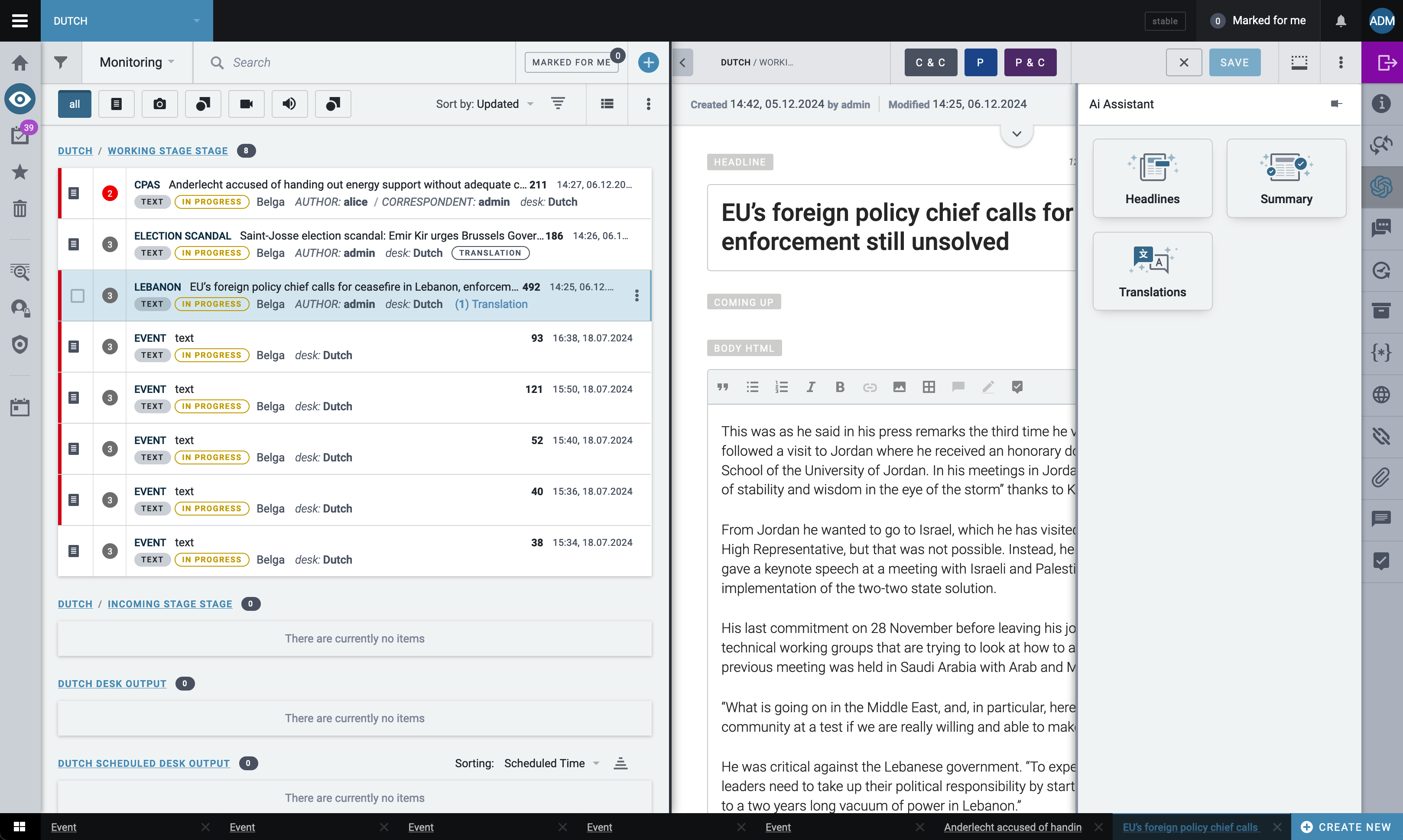 AI IntegrationCopyright Sourcefabric
 Filtering in Assignment View
A day filter has been added to the assignment view, allowing users to filter assignments by specific dates. This update is particularly useful for news organisations with a high number of planned articles or coverages. Previously, users would see all planned articles from various days, but now they can choose what day they would like to see in the assignment view. The filter also enables users to select “today,” “tomorrow,” “in 2 days,” or a specific date.
Visual Indication for Workflow and Coverage Statuses
A significant enhancement to the Superdesk Planning Component is the visualisation of the “Workflow Status,” which has been refined with colour-coding for a more consolidated and simplified view of coverages in the list view. Now, in the “Workflow Status,” users can easily identify the status of an item based on its colour, with each colour representing a stage of the workflow. We also added the status “Added to Workflow” for a clearer understanding of the workflow stages.
Additionally, we introduced indicators for the “Coverage Status.” An orange dot now marks items as “On Merit,” indicating that it’s still undecided whether the event will be covered by the news agency, while a red dot indicates “Not Covering.”
This visual indication enhancement helps users quickly identify the progress of each task at a glance.
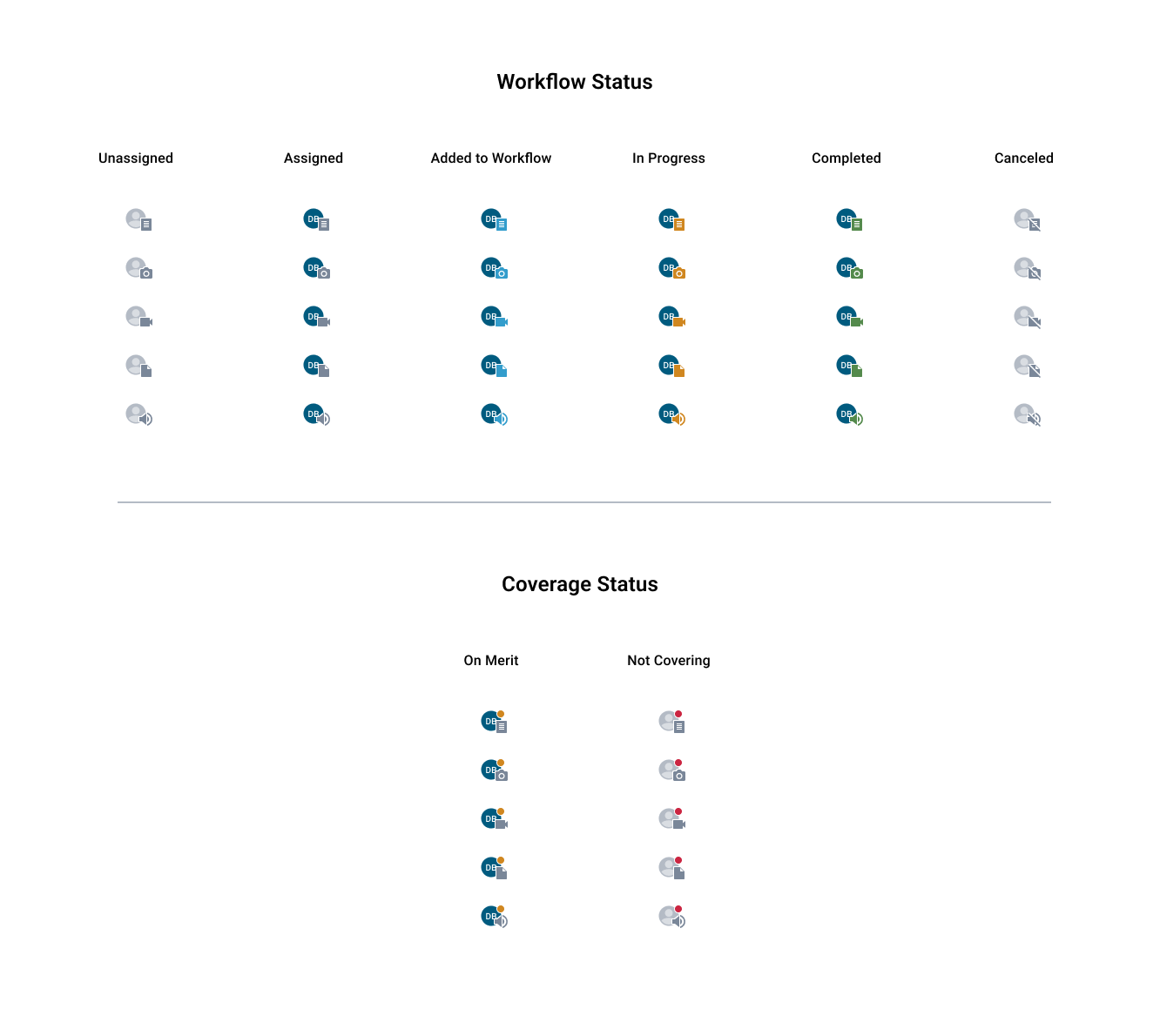 Visual Indication for Workflow and Coverage StatusesCopyright Sourcefabric
 JPEG Metadata Management
A major new feature is the ability to edit and store metadata directly within JPEG files. Previously, metadata was stored in accompanying XML files only. Now, when users upload an item, they can edit metadata – such as slug line, description, and transmission reference – directly in the JPEG file. This change is particularly important for news agencies that send images to multiple clients with differing metadata needs. Their customers no longer need the accompanying metadata files. Instead, they receive images with all relevant metadata embedded, making it easier for them to access the relevant metadata for images.
Custom Blocks
Custom blocks, a new feature co-developed with Dagbladet Børsen, Denmark's leading business newspaper, are now available in Superdesk 2.8. This feature enables users to create custom snippets of content in the editor pane, including elements such as lists and pull-quotes, which will be displayed in the final published article.
Managed within content profiles, custom blocks can be enabled or disabled based on client needs. Custom blocks allow users to include only essential formatting options and define templates to simplify onboarding and operation.
Full-Screen Article View
Finally, the update introduces a small UI change to the view of an article, revealing a formerly hidden feature: switching the article to full view mode can now be easily done with a clearly visible icon in the split-screen view. With one click to the monitoring eye icon, users can now extend the article view to full screen, allowing them to focus solely on their writing without distractions from the desk’s other activities.
Additionally, when the article is viewed in full screen, it stops sending data in the list view, which can be helpful for users in working environments with limited or intermittent internet connectivity.
From advanced AI capabilities to improved filtering in assignment view, these new features help news organisations manage their workload more effectively while exploring the potential of AI in newsrooms.
How can Sourcefabric's open-source tools improve your news organisation's performance? Get in touch to schedule a free demo.