Reaching new audiences with Superdesk 2.7
 Introducing Superdesk 2.7
For any serious news organisation, growing an audience requires meeting that audience where it lives – whether that’s on social media, at YouTube, or elsewhere online. With Superdesk 2.7, editors and journalists have all the tools they need to manage their workflows and effortlessly send content to the platforms where their audiences gather.
That spirit of efficiency underpins all the new features in our latest and most advanced version of Superdesk.
Rundown component for television and radio
One of the biggest updates we’ve made will help improve planning for news organisations that run broadcast operations. Superdesk 2.7 includes a new component to help manage rundowns for TV and radio shows – the item-by-item sequence of events outlining the segments and content to be featured in a program that producers and journalists need to put their shows on the air. Television and radio news has never been so smooth.
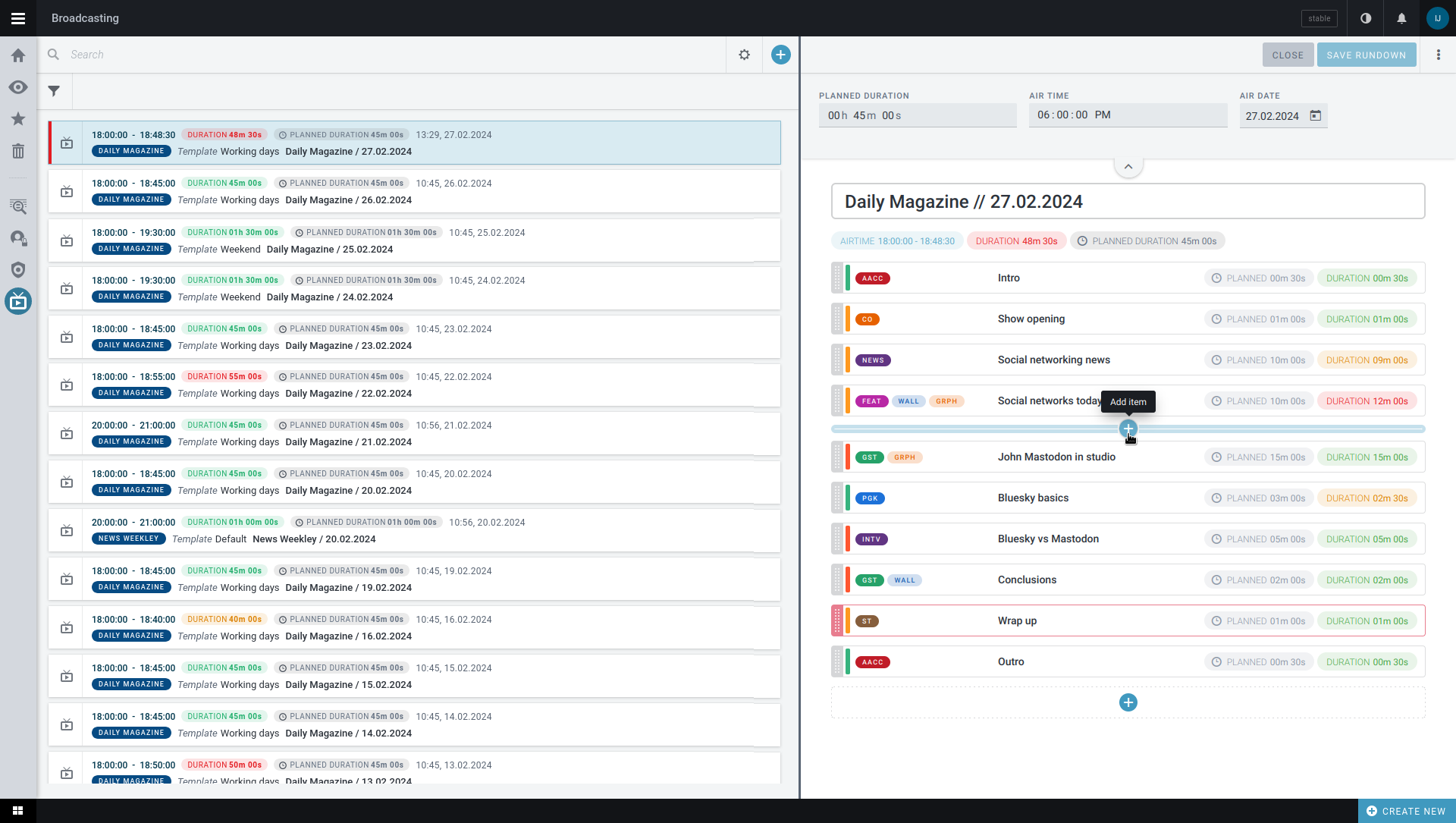 Rundown component for television and radioCopyrights Sourcefabic
 Schema from non-text content items
A bit more in the weeds but no less important, we’ve added the ability for news editors to do more with their photo, video, and audio metadata.
When content is uploaded or added to Superdesk, predetermined fields such as date, headline, and author appear. These fields can be configured, changed, and made mandatory. In previous versions of Superdesk, this degree of metadata flexibility was only possible for text items. We’ve now extended this feature and made it available for admins via the user interface to manage metadata for all types of media files.
Hide from Workflow
No matter where a news organisation publishes, it’s likely they feature coverage that is time-delineated or calendar based – like elections, holidays, and annual sporting contests. In the runup to these events, coverage can be comprehensive, but shortly after the event passes, related stories and items become irrelevant in the daily news grind.
The “Hide from Workflow” feature in Superdesk 2.7 helps render periodic content invisible until it’s needed again. For instance, editors might create a desk for “Elections 2024,” but once elections are over, they can pause the desk and remove it from the search function, keeping Superdesk clean and clutter-free. When the desk needs to be revived for “Elections 2025,” the desk can be resumed and made visible again.
Multilingual event planning and filtering
Finally, for newsrooms using the Superdesk Planning Component, it’s now possible to plan and view items in multiple languages at the same time. Fields such as event name, topic, location, and description can be completed for a single event in several languages, and editors can filter planning items by language when searching. These updates are designed to streamline planning activities in multilingual news organisations.
Whether you run a small, independent YouTube-based news provider or a continent-wide news agency, Superdesk 2.7 is fully customisable with features that will help you reach your viewers and readers with ease.
To learn more about Superdesk or to sign up for a free, visit www.superdesk.org.